Beta — a local-first meeting workspace for macOS
Your meetings are yours.
Gistlist records and transcribes meetings on your Mac. Summaries run on local Ollama by default, or through Claude or OpenAI with your own API key. Notes are plain markdown files saved where you choose; Claude reads them on demand through MCP.
Free for personal use.
macOS 12+ · Apple Silicon · Beta · Source-available
What it does
Prep before the call
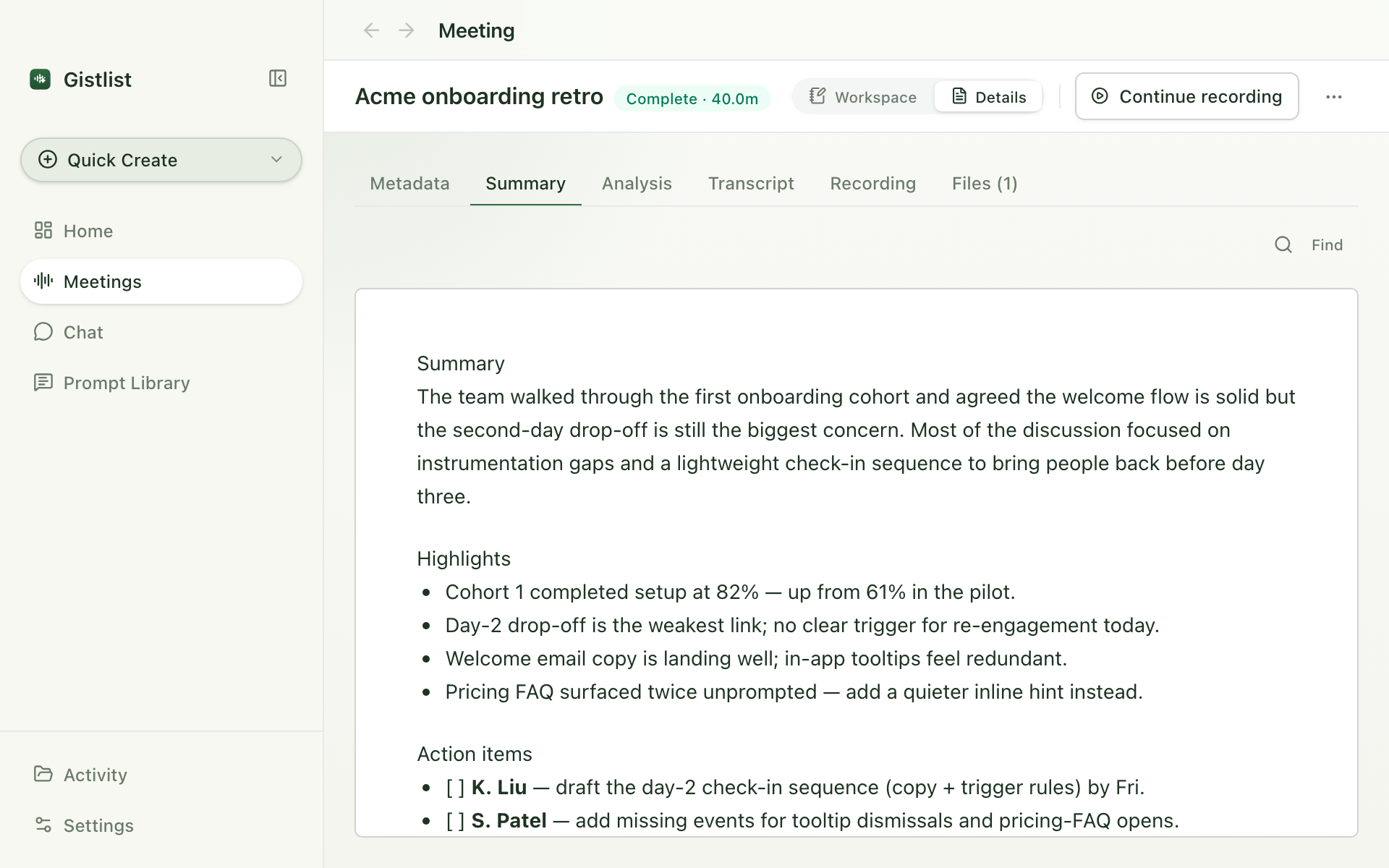
Stage context, participants, and prompts before the call. Gistlist attaches them to the run when you hit record.
Records mic and system audio
Audio is written to disk continuously. Pause and resume mid-meeting whenever you need to.
Transcribes on your machine
Parakeet on Apple Silicon, or OpenAI Whisper if you'd rather use the cloud.
Summarizes with prompts you can edit
One default summary plus any number of your own — coaching review, decision log, follow-up email draft, customer recap.
Writes markdown to disk
Your notes are plain files. Drop them into an Obsidian vault if that's where you live, or keep them in any folder you like.
Available in Claude Desktop
Search and reason over your meeting library in Claude, through a local MCP server. No copy-paste.
Your meetings are yours.
Gistlist runs on your machine. Recordings and transcripts are written to a folder on your disk — there is no Gistlist-hosted notes service to upload them to.
For transcription, Parakeet runs locally on Apple Silicon by default; OpenAI Whisper is available if you'd rather pay per minute. For summaries, local Ollama is the default and runs fully on your Mac — Claude or OpenAI are there if you'd rather use a cloud model with your own API key. Whichever you pick, the call goes directly from your machine to that provider — we never see it.
Your notes are yours.
Notes are plain markdown files in a folder you choose. Open them in any editor. Point Gistlist at your Obsidian vault if that's where you already live. They'll still be readable in ten years.
Your prompts are yours.
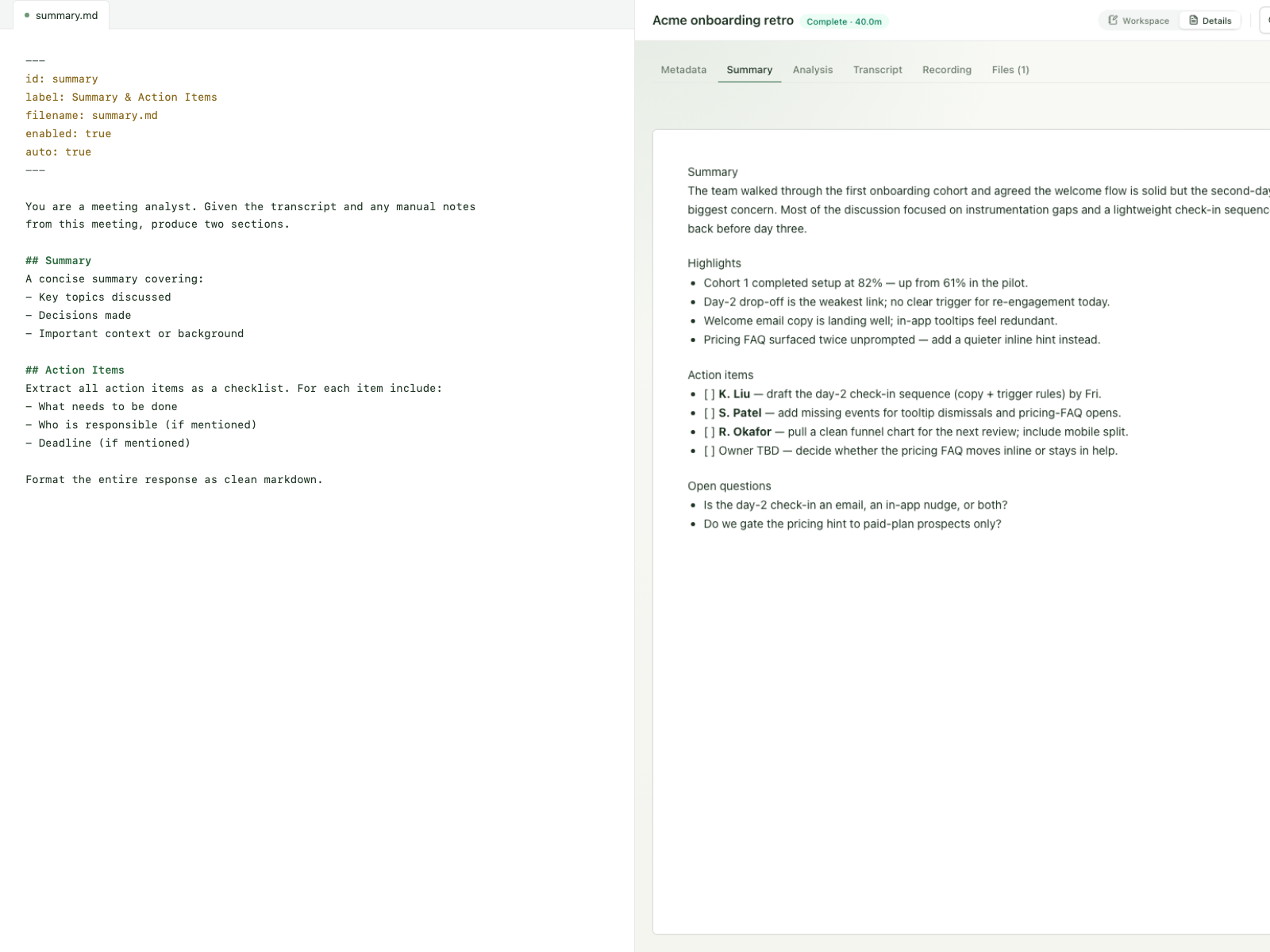
You own the pipeline. Every output is a prompt you write — a summary, action items, a decision log, a follow-up draft, a customer recap, or anything else you need. Each one is a markdown file on your disk.
Change the prompt, change the output. Open it. Edit it. Fork it. Delete it.
Ask Claude about your meetings.
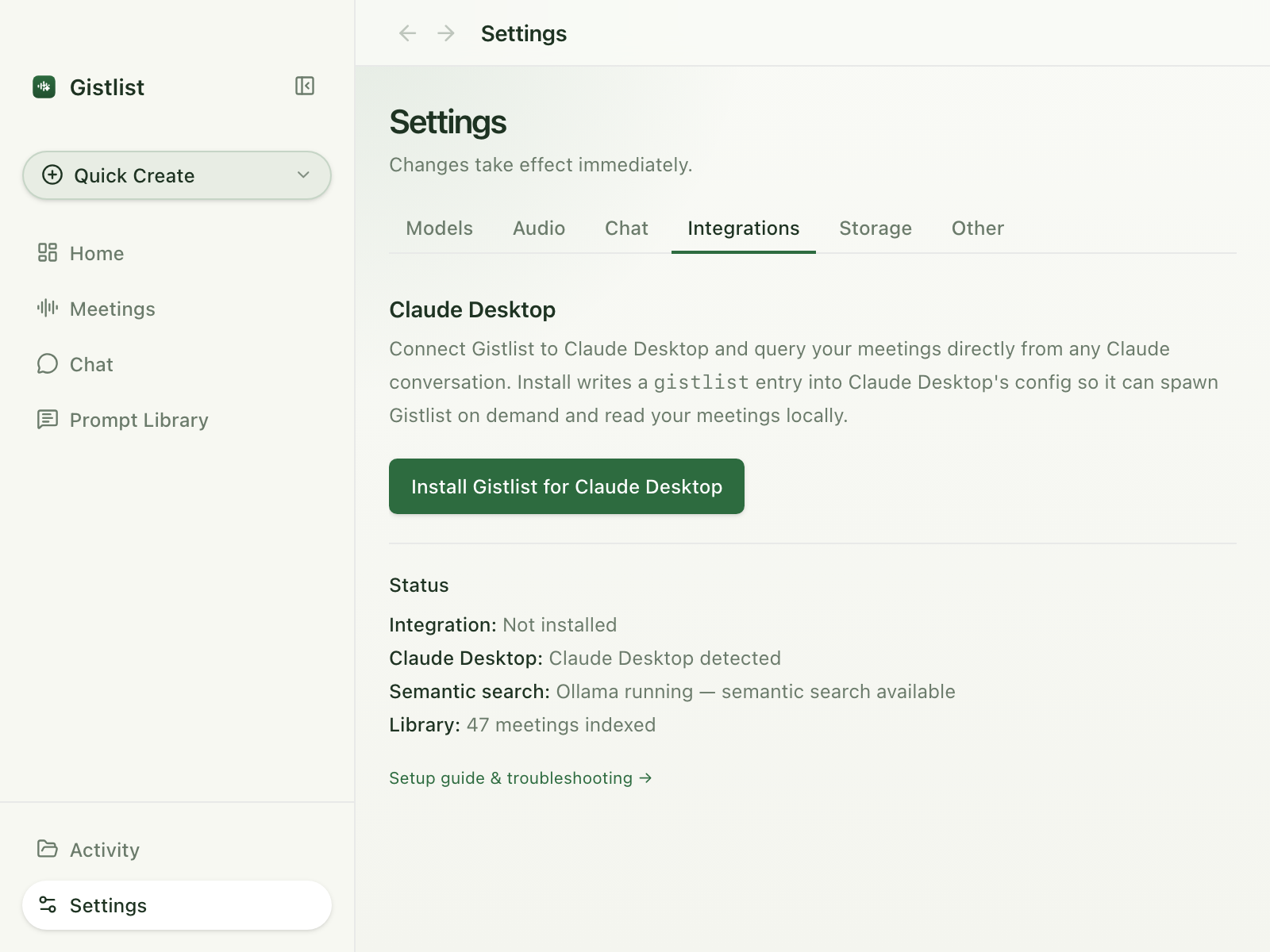
Gistlist lets Claude Desktop search, read, and reason over your meeting library — transcripts, summaries, participants, dates — in the Claude app you already use, with your existing subscription.
- "What did we decide about pricing with Acme last month?"
- "Summarize my 1:1s with Jordan from the past quarter."
- "Show me every meeting where Alex mentioned churn."
Claude cites the transcript. Jump straight to the moment in the audio.
One click to connect.
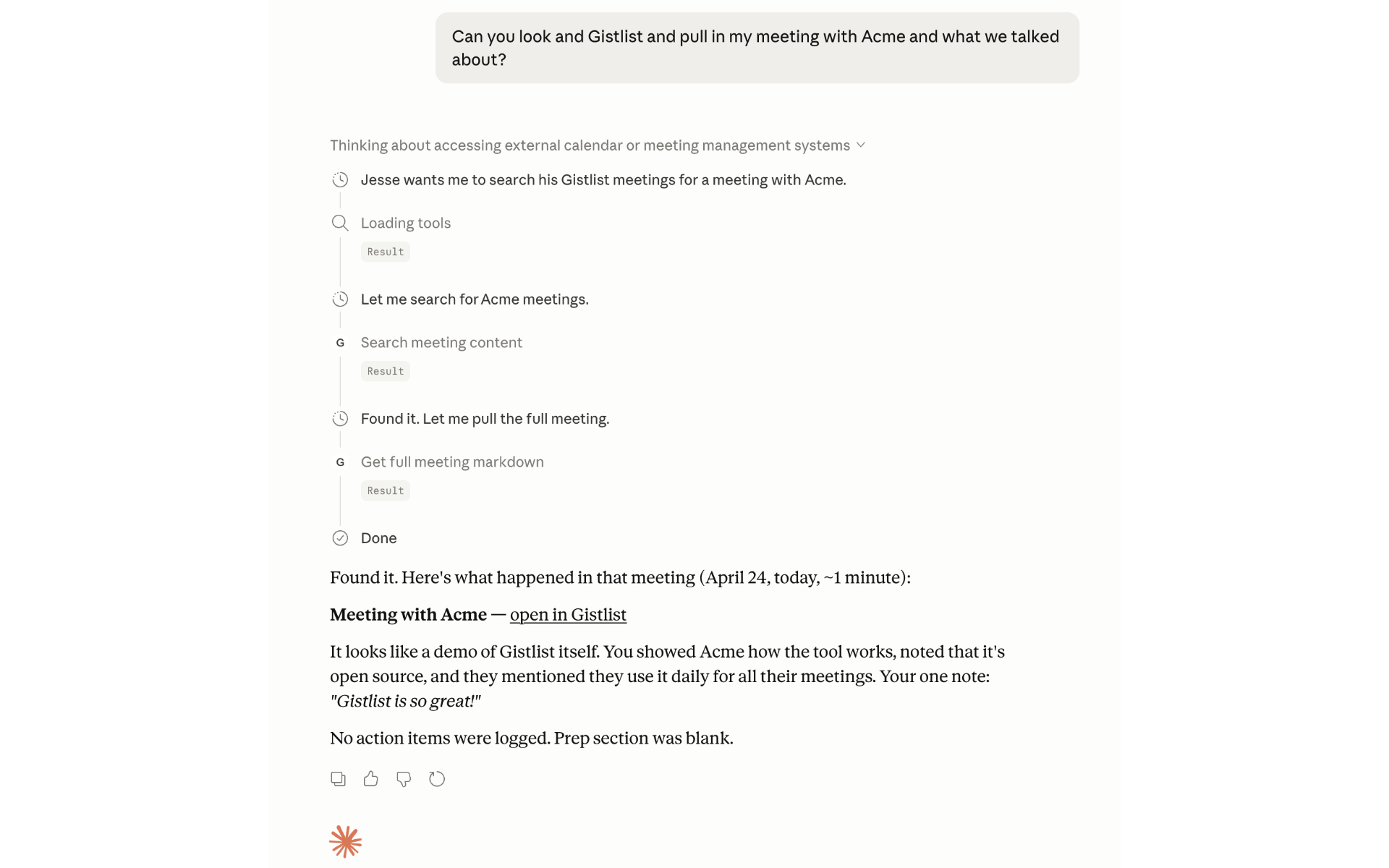
Open Gistlist → Settings → Integrations. Click Install. Restart Claude. Done.
Hybrid retrieval.
Keyword out of the box. When Ollama is running (the default for new installs), Gistlist adds semantic search over meeting embeddings — so "the call where we talked about churn" finds the right meeting even if no one used the word "churn."
Your meetings stay on your Mac.
Gistlist hands Claude the content it asks for and nothing more. What you then ask Claude about goes to Claude, same as any text you type into it.
How it works
Gistlist stitches together battle-tested open-source tools — FFmpeg, AudioTee, Parakeet, Ollama, SQLite — into a pipeline that runs close to the metal on your laptop.
Recording and Parakeet transcription run locally by default. Summaries run through whichever provider you pick — local Ollama for a fully offline pipeline, or Claude / OpenAI with your own API key.
- Record FFmpeg AudioTee
- Transcribe Parakeet OpenAI
- Process Ollama Claude OpenAI
- Index SQLite Full-text Vector
- Chat Hybrid search
local cloud (only if you bring a key)
Recording
Mic captured via a bundled native CoreAudio helper for clean USB-mic input, with a bundled FFmpeg AVFoundation fallback when the helper isn't available. macOS system audio captured via AudioTee, a CoreAudio tap helper bundled as a patched binary. Audio is written to disk continuously, and pause / resume mid-meeting are first-class operations.
Transcription
A pluggable speech-to-text (ASR) layer. Run Parakeet locally on
Apple Silicon (the default), or bring an OpenAI API key (stored in
the macOS Keychain) for cloud Whisper. Output is a canonical,
timestamped transcript.md that every downstream feature
reads.
Summaries and custom outputs
One default summary prompt plus any number of user-defined prompts run
in parallel against Ollama, Claude, or OpenAI — configurable per
prompt. Prompts are plain .md files on disk. No
registry. No database. Edit and version-control them like code.
Search — for Claude
- Speaker-turn chunker for transcripts; markdown chunker for notes.
- Embeddings via local Ollama (
nomic-embed-text) — no embedding data leaves the machine. - Storage:
better-sqlite3with FTS5 (lexical) plussqlite-vec(semantic). - Retrieval: parallel FTS and vector queries merged with Reciprocal Rank Fusion (RRF).
- Citation-worthiness guardrail that fails closed — no citation, no claim.
- Resumable backfill state machine: delete the index and rebuild without re-recording.
- Exposed to Claude Desktop over a local MCP server — the same index answers your questions.
Claude Desktop MCP server
Gistlist ships a local MCP server inside the app. When you click Install in Settings → Integrations, Gistlist adds a single entry to Claude Desktop's config so Claude can spawn Gistlist on demand and query your meetings over a local stdio pipe. The server itself makes no outbound network calls (except to your local Ollama for semantic search, when running). The meeting excerpts Claude requests then become part of your Claude conversation, handled by Anthropic per their terms.
Storage
Every meeting is an editable .md tree under a folder you
own. git, rsync, Obsidian (optional integration) — your choice.
SQLite is just an index, not the source of truth.
Desktop shell and distribution
Electron with renderer sandbox: true, a scoped preload
bridge, and all filesystem paths validated against the configured
runs root. Signed and notarized DMG. Bundled FFmpeg and Ollama
binaries verified at build time. License: FSL-1.1-ALv2
(source-available).
Why this exists
Meetings are where a lot of thinking happens. That kind of thinking deserves a tool that treats it the way a good notebook does — private by default, quick to open, and easy to keep.
Gistlist records the meeting, writes the summary, and saves the file on your disk. That's it.
It's free for personal use. If anything paid shows up later, it'll sit on top of the free core — never in front of it. Your data is yours either way.
Questions: support@gistlist.co
It's Beta. Tell us what breaks.
Bug reports, feature requests, weird edge cases — we want to hear them. Email is fastest; GitHub Issues is fine too.